
There are three options when deciding to turn this feature on in account settings under System Settings > Delivery Auto-Adjust
NOTE: This setting is only available for accounts on the Default (Targeted) Delivery Mode NOT Delivery Batch Update (Full Batch)
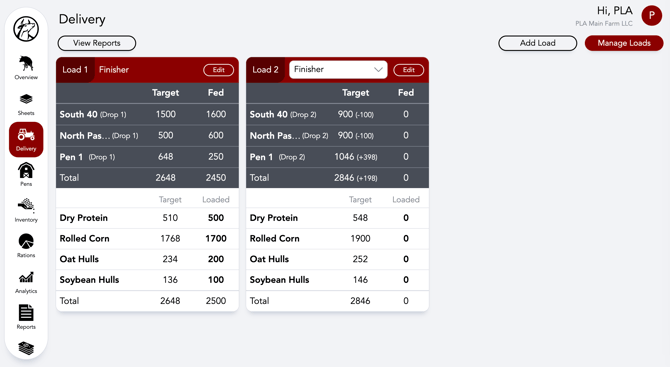
Next Drop-As Fed
When overfeeding or underfeeding a drop this will adjust the next drop for said pen to align with a higher or lower target to reach the end of day total target.
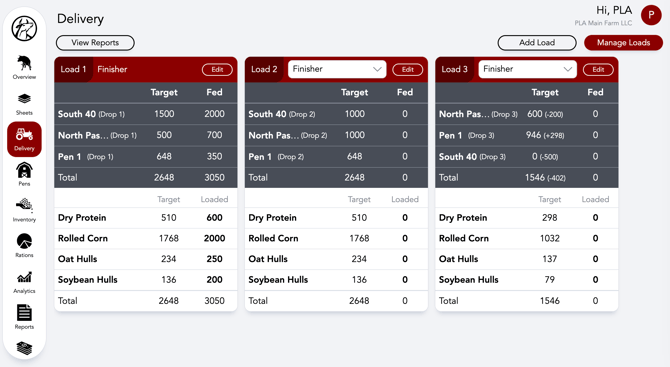
Last Drop-As Fed
If a pen is fed 2-4 times a day this option will adjust the pen's last drop of the day to correct under or overfeeding earlier in the day no matter which drop inconsistencies happened.
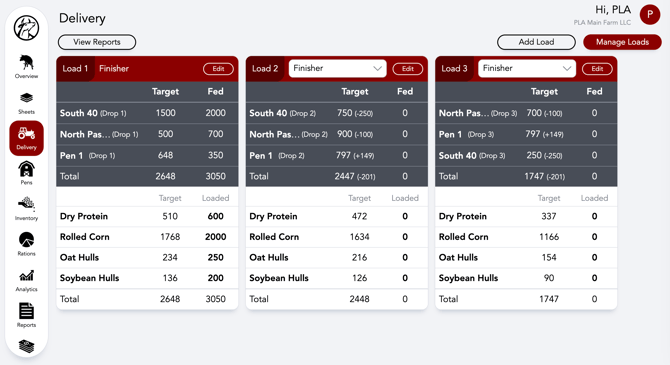
Distribute-As Fed
With this option selected, over or underfeeding a drop will auto adjust all remaining drops' targets for the pen with the weight distributed evenly. This option is applicable to pens with two to four feedings a day.
Our Customer Success team is here to help. If you have questions, call us at 515-337-2187 or email us at support@cattlekrush.com. Be sure to take advantage of our complete resource library and how-to videos created to help you succeed.