
Finding Your Reports
Navigate to the Reports Tab of your Performance Beef account
- Select Operating Revenue under "Other" of the left drop down.
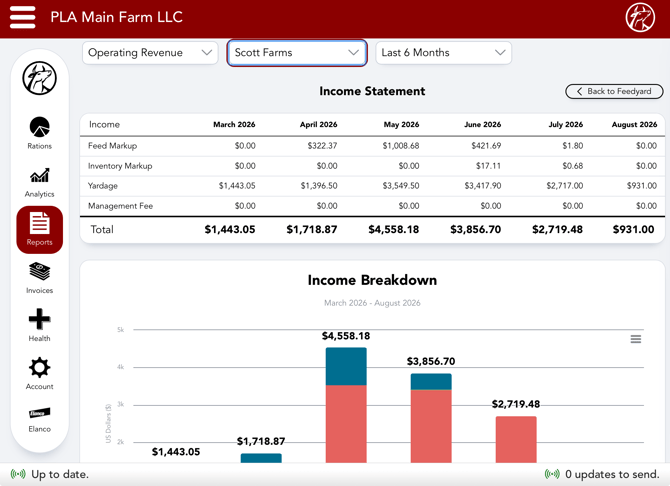
- The middle drop down selection filters owners, with the main operation name staying at the bottom
- You can choose to view a report based on just one single owner or analyze all income for the operation across all owners when selecting the main operation name.
- The right drop down will allow for a date range selection
- Last 6 Months
- Last 6 Quarters
- Last 6 Years
- The right drop down will allow for a date range selection
Note: Before evaluating these reports be sure all commodities necessary are marked up and back dated accordingly and also ensure yardage and management fees are applied as intended.
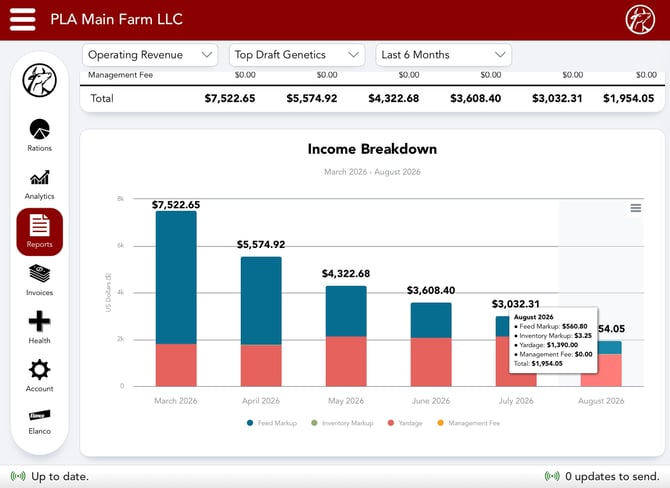
Income Statement
- The top half of the report will display the breakdown of your revenue based on the timeframe selected
- Each month, quarter or year will have it's own column
- Rows are either broken down by Income Type or by Owner which is a dropdown selection to the far right
- The graph portion of the report adjusts to the above filters to align with the Income Statement
- It can addition ally be exported in various formats:
- PNG Image
- JPEG Image
- PDF Document
- SVG Vector Image
- Owners or Income Types are represented by differing colors within the bar graph shown across the Y-axis which allocates dollar amounts for income
- The timeframe selection is represented by the X-axis of the bar graph
Any time there is a single owner in view "Back to Feedyard" in the top right can be selected to revert back to see revenue across the entire yard rather than re-selecting the main account in the middle drop down again.
Our Customer Success team is here to help. If you have questions, contact us by calling 515-337-2187 or email us at support@cattlekrush.com. Be sure to take advantage of our complete resource library and how-to videos created to help you succeed.