
On standard Performance Beef accounts, projected weight and other performance values are calculated based on the custom Rate of Gain value entered for each group.
With the addition of the Growth Model the following factors are taken into account to calculate an estimated projected weight and related performance values:
-
-
-
- Net Energy for Maintenance (NEm)
- Net Energy for Gain (NEg)
- Dry Matter Intake
- Start Weight
- Check Weights
-
-
-
-
-
- Sold Weight
- Breed
- Gender
- Cattle Condition
- Local Weather
-
-
The Growth Model is a beneficial tool for both you and your trusted advisers to analyze trends in feed efficiencies, costs and cattle performance. For this additional tool, we encourage you to talk with your nutritionist or contact our Customer Success team.
Turning on the Growth Model in Performance Beef:
- Account Settings
- Report Settings
- Change Average Daily Gain drop down from Custom Value to System Generated
- Inventory - enter NEm and NEg values
- These need to be whole numbers (Ex. 67 not .67)
Just like when entering price and dry matter, energy values can be updated and backdated at the ingredient level. Total ration energy values will also be displayed on the ration tab.
Check weights
- Click on the Reports tab on the left side of your Performance Beef account.
- Click on the drop-down box on the upper left corner of the screen and select Closeout (A or B).
- Click on the second drop-down box from the upper left corner of the screen and select the Group ID you want to see a closeout report for.
- Click the Base (or Eff.) button at the top of the screen.
- This tool calculates an adjusted efficiency factor by evaluating feed inputs, environment, genetics and most importantly-actual progress captured by a check weight.
- Check weights should be a quality sample of a group meaning an accurate representation of the entire set of animals. Ideally these are not the 10 sickest, heaviest, etc but rather the entire group weighed and getting an average OR a portion of the total head that represent the majority in size, age, DOF and/or weight.
- This tool calculates an adjusted efficiency factor by evaluating feed inputs, environment, genetics and most importantly-actual progress captured by a check weight.
Note: If recording individual weights via Health, an average weight from past sessions will populate as a reference. They will not automatically adjust the Growth Model.
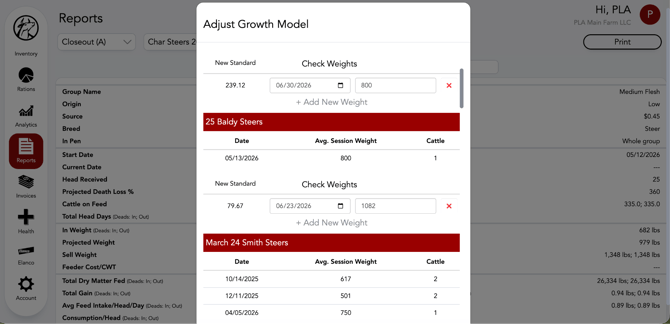
5. Click the + Add New Weight and enter the date and the average weight of the animals. Click outside of the weight box to trigger the calculation.
6. A New Standard will calculate based on the check weight. Click outside of the pop-up window to see the adjusted Closeout Report. This update will also adjust weight related graphs in the Analytics tab.
These updated projections allow real-time visibility on how daily inputs and trusted advisor relationships can drive confident data-centered decisions. Utilizing a growth model allows for better understanding of animal performance before they leave your operation and how management practices may need to be adjusted throughout a group's time on feed.
Our Customer Success team is here to help. If you have questions, call us at 515-337-2187 or email us at support@cattlekrush.com. Be sure to take advantage of our complete resource library and how-to videos created to help you succeed.
Navigate Analytics to visualize feeding accuracy, cattle performance and much more.
Visit Web Settings to learn how to share your account with family, nutritionists, vets, feed hands and other trusted advisors.